Short answer: FOMO documents Apple Pay, card and supported crypto funding routes. Availability, charges and arrival times depend on the provider and network; we have not timed deposits. The documented crypto deposit asset is USDC on five supported chains and USDG on Robinhood Chain, where it converts to the Solana USDC cash balance. Check the asset, chain and quoted amount before sending.
Independent affiliate guide. We may earn a share of trading fees through our code. Product instructions are based on public documentation unless a specific observation is labelled. Evidence and limits.
The three routes, and what each really costs
Funding routes into a FOMO account. FOMO does not charge a deposit fee itself; the costs below sit with the payment provider or the network.
| Route | Speed | What it costs | Best for |
|---|---|---|---|
| Apple Pay | Provider dependent; not timed here | Check provider fees and conversion quote | When offered by the payment provider |
| Debit or credit card | Provider or network dependent | Availability and cost depend on the card provider's country list | When Apple Pay is unavailable |
| Supported crypto asset and chain | Provider or network dependent | Sender or provider charges may apply; check the transfer quote | Larger amounts, anyone who already holds crypto |
FOMO lists Solana, Base, BNB Chain, Monad, Ethereum and Robinhood Chain. Deposit assets differ: Robinhood Chain uses USDG; the other five use USDC. Supported networks do not establish availability in every country. Card access depends on the provider and account; check the in-app options.
Compare the total you will pay with the crypto you will receive, including any separately listed payment or conversion fees. A difference from a market reference price can include spread, fees and price movement; it is not evidence of a single hidden charge. We have not tested which funding route is cheapest for your amount or country.
Depositing with Apple Pay, step by step
Open the funding screen
Tap the balance or the deposit button on the home tab.
Choose Apple Pay and an amount
Enter the amount in your local currency. The app shows the crypto you will receive.
Check the quote before confirming
Compare the quoted amount against the live market price. Read any listed charges, exchange rate and terms before accepting the quote.
Confirm with Face ID
Complete the provider's confirmation steps, then check the credited balance and transaction status. The arrival time has not been tested here.
Depositing crypto instead
A FOMO account is a non-custodial wallet powered by Privy, according to its documentation. Open the deposit screen, select the supported asset and chain, and copy the address shown for that route. Do not infer that any token on a supported chain can be credited.
Match the network and deposit asset. Confirm that the sender's network matches the receiving instructions, even when an address looks familiar. A small test transfer can help check a route, but may incur sender fees and minimums. FOMO's coverage of Solana trading gas does not prove an incoming transfer is free. Wrong-network recovery depends on the route; contact official support rather than assuming recovery or loss.
Depositing on Robinhood Chain works differently from the other five: the deposit asset there is USDG, which FOMO converts into your Solana USDC cash balance rather than keeping as a separate token. Every other chain deposits directly as USDC. See the full chain breakdown for what each one supports.
How much to deposit
Other guides skip this part. On Solana, FOMO prices trades in four bands by order size: under 5 USDC a flat 0.10 USDC, 5 to 47.50 USDC a 2% fee, 47.50 to 190 USDC a flat 0.95 USDC, and 190 USDC and above a flat 0.50%. A $20 order pays 2%, or $0.40. A $50 order pays a flat $0.95. That fee applies on the way in and again on the way out, so a $50 position that you open and close pays $1.90 in fees, a 3.8% round trip before any price movement.
A 190 USDC standard Solana order incurs 0.95 USDC in platform fees, or 0.50%. That threshold describes a fee rule, not a recommended deposit or position size. Do not increase the amount at risk just to reach a cheaper percentage band. Orders under 5 USDC incur 0.10 USDC, which can exceed 2% of the order.
The full arithmetic at each trade size is on the fee page. If you are funding with less than 47.50 USDC per trade, consider whether a flat-percentage competitor suits your trade size better. We would rather tell you that than take the signup.
Referral code
VIP10
FOMO's published offer: 10% off trading fees
Sign up with VIP10 first →FOMO documents a reduction from its standard 0.50% fee to 0.45%. Duration and discounts on other fee bands are not specified. The public VIP10 page displays this offer; account acceptance has not been independently tested here. Check the fee in your account. Terms can change.
Independent affiliate guide. We may earn trading-fee commission if you use our code.
If the deposit does not arrive
- Card declined: payment availability depends on the bank and payment provider's country list. Ask the bank or provider which funding methods are supported; we have not compared decline rates.
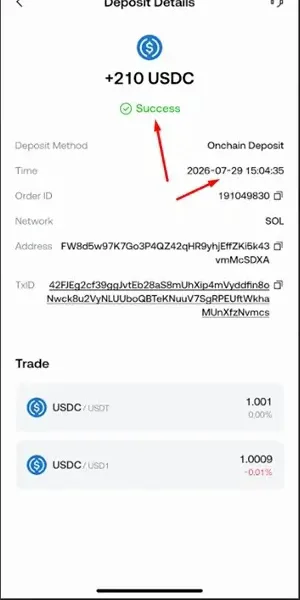
- Crypto sent, nothing showing: check the transaction on a block explorer such as Solscan. Check the network and asset as well as the address. Confirmation alone does not establish why the app balance is missing; contact official support with the transaction ID.
- Wrong chain: recovery depends on the network, asset and wallet support. Consult official recovery instructions; do not assume either guaranteed recovery or automatic loss.
Before you deposit anything
Check the intended referral during signup. If you already have an account, FOMO documents support-assisted attachment and changes in specific situations. Verify the relevant fee and payment quote before committing funds; the public referral offer has no documented unconditional lifetime duration.
Next: making your first trade, getting money back out, FOMO's own fee schedule, or the full review if you have not decided yet.
Sources and dates
These sources support the documented claims. A public-source check does not verify account acceptance or a completed trade. Historical observations retain their original dates. Read the evidence limits and corrections.